
Character Counter
Character Counter – Free Online Tool to Count Characters, Words, and Text Statistics
Writing today is not just about expressing ideas. Whether you are writing a blog post, preparing an academic assignment, creating social media posts, or optimizing website content, text length matters more than ever. Many platforms have strict character limits, and exceeding them can cause formatting problems or even rejection of your content. This is why a reliable Character Counter is an essential tool for writers, students, and professionals. Character Counter Tool
A Character Counter helps you instantly calculate the number of characters, words, sentences, and paragraphs in your text. Instead of manually counting or estimating, this tool provides accurate statistics within seconds. It also helps improve writing efficiency, maintain content limits, and optimize text for different platforms.
What is a Character Counter?
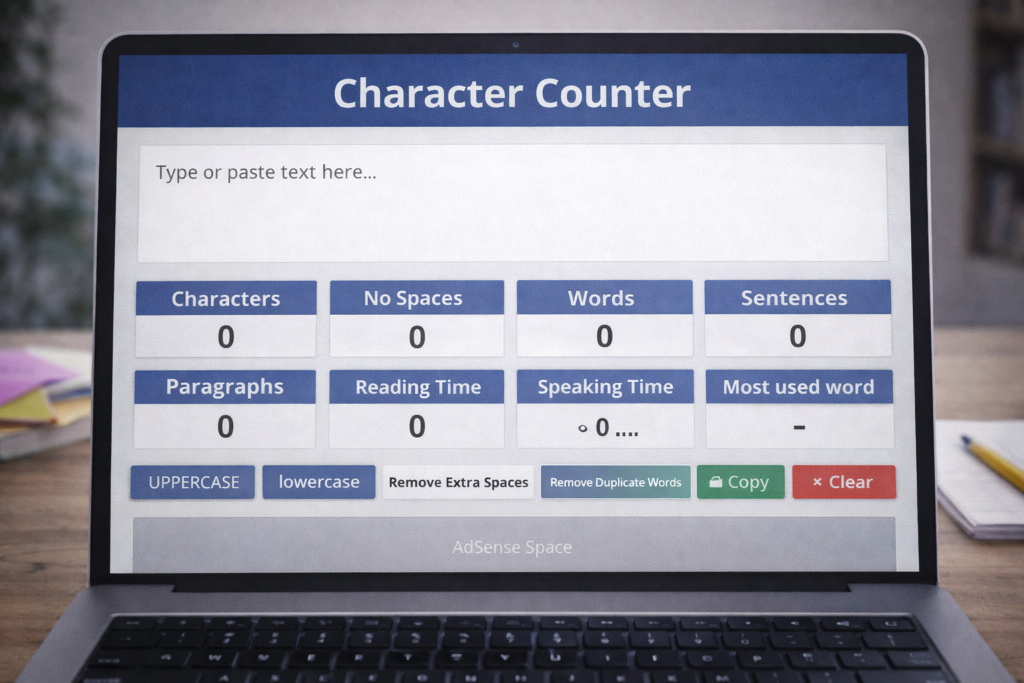
A Character Counter is an online tool that counts the number of characters in a piece of text. Advanced character counters also provide additional information such as word count, sentence count, paragraph count, and reading time. Character Counter Tool
For example, if you paste a paragraph into the tool, it can show:
- Total characters
- Characters without spaces
- Total words
- Total sentences
- Number of paragraphs
- Reading time estimate
- Speaking time estimate
This information helps writers structure their content better.
Why Character Count is Important
Character count is important because many platforms require content within specific limits. If your text exceeds the limit, it may get cut off or rejected. Character Counter Tool
Examples include:
Meta descriptions
Search engines usually display around 150–160 characters.
Social media posts
Platforms like Twitter and LinkedIn have character limits.
Ad copy
Advertising platforms often limit text length.
Academic writing
Some assignments require strict word or character counts.
SMS messages
Text messages also have character restrictions.
Using a Character Counter ensures your content stays within limits.
Features of This Character Counter Tool
This Character Counter is more than a simple counter. It includes advanced text analysis features such as:
- Character count with spaces
- Character count without spaces
- Word count
- Sentence count
- Paragraph count
- Reading time calculation
- Speaking time calculation
- Most used word detection
- Remove extra spaces
- Remove duplicate words
- Text formatting options
- Copy text option
- Download text option
- Clear text button
- Live counting while typing
- Mobile-friendly design
- Free unlimited usage
These features make it a complete writing analysis tool.
How to Use the Character Counter Tool
Using this tool is very easy:
Step 1: Paste or type your text
Step 2: Watch the statistics update automatically
Step 3: Review the character and word counts
Step 4: Edit text if needed
Step 5: Copy or download your text
There is no complicated process. Everything updates instantly. Character Counter Tool
Who Should Use a Character Counter?
This tool is useful for many different users.
Students
Students can check assignment length and stay within limits.
Bloggers
Bloggers can optimize article length for SEO.
Content writers
Professional writers can meet client word requirements.
Digital marketers
Marketers can optimize ad copy and landing pages.
SEO professionals
SEO experts can optimize titles and meta descriptions.
Authors
Book writers can track manuscript progress.
Anyone working with text can benefit from this tool.
Benefits of Using a Character Counter
Using a Character Counter provides several advantages:
- Accurate text measurement
- Faster editing process
- Better content planning
- Improved writing structure
- Professional content preparation
- Time-saving analysis
- Better SEO optimization
Instead of guessing content length, you get exact numbers instantly. Character Counter Tool
Understanding Characters With and Without Spaces
Many users wonder about the difference between characters with spaces and characters without spaces.
Characters with spaces:
Includes all letters, numbers, symbols, and spaces.
Characters without spaces:
Counts only letters, numbers, and symbols.
Example:
Text:
Hello World
Characters with spaces:
11
Characters without spaces:
10
Both measurements are useful depending on requirements. Character Counter Tool
Importance of Word Count Alongside Character Count
Character count alone is sometimes not enough. Word count helps understand content depth.
For example:
A 3000-character article may contain around 450–600 words, depending on writing style.
Knowing both metrics helps writers plan content effectively.
Reading Time and Speaking Time Features
Modern writing tools often include reading time estimates. This helps writers understand how long readers may spend on content.
Average reading speed:
About 200 words per minute.
Average speaking speed:
About 130 words per minute.
Example:
1000 words:
Reading time ≈ 5 minutes
Speaking time ≈ 8 minutes
This information is useful for bloggers, educators, and presenters.
How Character Counters Help SEO
SEO content often requires specific text lengths. For example:
Title tags should usually stay within about 60 characters.
Meta descriptions should stay around 150–160 characters.
Headings should be clear and concise.
Character counters help writers maintain these limits.
Well-optimized text improves search visibility and user experience.
How Character Counters Help Social Media Writing
Social media platforms often have character limits.
Examples:
Twitter (X):
Limited characters per post.
Instagram:
Caption limits.
LinkedIn:
Post character recommendations.
Using a Character Counter helps you craft posts that fit platform requirements.
Advanced Text Cleaning Features Explained
This ULTRA Character Counter also includes text cleaning features.
Remove extra spaces
Cleans unnecessary spacing.
Remove duplicate words
Removes repeated words.
Example:
Hello hello hello → Hello
Uppercase conversion
Changes all text to capital letters.
Lowercase conversion
Converts text to small letters.
These features make text editing faster.
Why Writers Use Text Analysis Tools
Professional writers often rely on text analysis tools to improve writing efficiency.
These tools help:
- Check writing structure
- Improve clarity
- Maintain limits
- Improve formatting
- Speed up editing
Small improvements can greatly improve writing quality.
Common Mistakes This Tool Helps Avoid
Many writers make simple mistakes like:
- Writing too much text
- Ignoring character limits
- Adding unnecessary spaces
- Repeating words
- Not checking readability
This tool helps identify and fix these issues.
Why Text Length Matters for Professional Writing
Professional writing requires precision. Whether writing emails, reports, or marketing content, correct length matters.
Short text may lack detail.
Long text may lose reader interest.
Balanced text improves communication.
Character counters help achieve this balance.
Best Practices When Using a Character Counter
Here are some useful tips:
- Always check limits before publishing
- Keep titles concise
- Remove unnecessary words
- Maintain readability
- Use text cleaning features
- Focus on clarity over length
These practices improve writing quality.
How Character Counters Improve Productivity
Small productivity tools like this can save significant time.
Instead of manual counting, you get instant results.
This helps:
- Speed up editing
- Improve efficiency
- Reduce errors
- Improve workflow
Over time, these improvements add up.
Why Every Writer Should Use a Character Counter
Professional writers rarely publish content without checking length. Character counting is a basic writing practice.
It helps ensure:
- Content meets requirements
- Text is properly structured
- Content looks professional
- Writing is optimized
This makes it an essential writing tool.
Real World Applications of Character Counters
Common uses include:
- Blog writing
- Academic essays
- Marketing content
- Social media posts
- Email writing
- SEO content
- Report writing
This makes it a universal writing utility.
Final Thoughts
Writing is not just about ideas. Structure, formatting, and length also play an important role. A Character Counter helps you understand your content better and improve writing quality.
Whether you are writing for SEO, academics, marketing, or personal projects, knowing your text statistics can help you work more efficiently. Tools like this simplify writing tasks and help maintain professional standards.
Use this Character Counter regularly as part of your writing process. Small improvements like maintaining proper text length and formatting can significantly improve content quality over time.
Start using the Character Counter today and take better control of your writing.
Frequently Asked Questions (FAQs)
What is a Character Counter?
A Character Counter is a tool that counts characters, words, and other text statistics.
Is this Character Counter free?
Yes, it is completely free.
Can I count characters without spaces?
Yes. The tool shows both counts.
Does this tool count words too?
Yes. It also shows word, sentence, and paragraph counts.
Who should use this tool?
Writers, students, bloggers, marketers, and SEO professionals.
Does character count affect SEO?
Yes. Titles and meta descriptions often require specific lengths.
Can I use this tool for social media posts?
Yes. It helps stay within platform limits.
Does the tool update automatically?
Yes. Statistics update as you type.
Can I clean text using this tool?
Yes. It includes text cleaning features.
Do I need technical knowledge?
No. The tool is simple to use.