
reduce pdf file size online free. Large PDF files create real problems. They clog your inbox, slow down uploads, and sometimes get rejected outright by application portals, job boards, and email providers. If you have ever tried to send a PDF and received a “file too large” error, you already know the frustration.
The good news is that you can reduce PDF file size online free, without installing any software or paying for a subscription. This guide walks you through exactly how PDF compression works, which methods actually preserve quality, and how to pick the right tool for your specific situation.
Why PDF Files Become Too Large
Before you compress a PDF, it helps to understand why the file grew large in the first place. Most bloated PDFs share one or more of these causes.
High-Resolution Images
Scanned documents and PDFs with embedded photos carry the biggest file sizes. A single high-resolution image can add several megabytes to an otherwise simple document. reduce pdf file size online free
Embedded Fonts
When a PDF embeds full font families instead of referencing standard system fonts, the file size increases. This happens often with design software exports like InDesign or Illustrator.
Unoptimized Scans
Scanned PDFs frequently use uncompressed or lightly compressed image formats. A 10-page scanned document can easily exceed 20MB if the scanner settings were not optimized. reduce pdf file size online free
Redundant Data and Metadata
Some PDFs carry hidden layers, unused objects, revision history, or bloated metadata left over from multiple edits. These add weight without adding value.
Multiple Merged Documents
When you combine several PDFs into one file, you also combine all their individual overheads, fonts, and images, which compounds the total size.
How PDF Compression Actually Works
PDF compression tools reduce file size through a few core techniques. Understanding these helps you choose settings that match your needs.
Image downsampling reduces the resolution of embedded images, since most PDFs don’t need print-quality 300 DPI images for on-screen viewing. Compression tools typically downsample to 150 DPI or 72 DPI, depending on the compression level you select.
Image recompression applies stronger JPEG or JPEG2000 compression to embedded images, which lowers image quality slightly while cutting file size significantly.
Font subsetting keeps only the characters actually used in the document instead of the entire font file, which trims unnecessary data.
Object and metadata stripping removes duplicate objects, unused bookmarks, hidden layers, and excess metadata that don’t affect what you see on the page.
A well-built compression tool applies these techniques together, which is why online compressors can often shrink a file by 60-90% without a visible difference in quality. reduce pdf file size online free
Step-by-Step: How to Reduce PDF File Size Online Free
Follow these steps to compress your PDF quickly and safely using a free online tool.
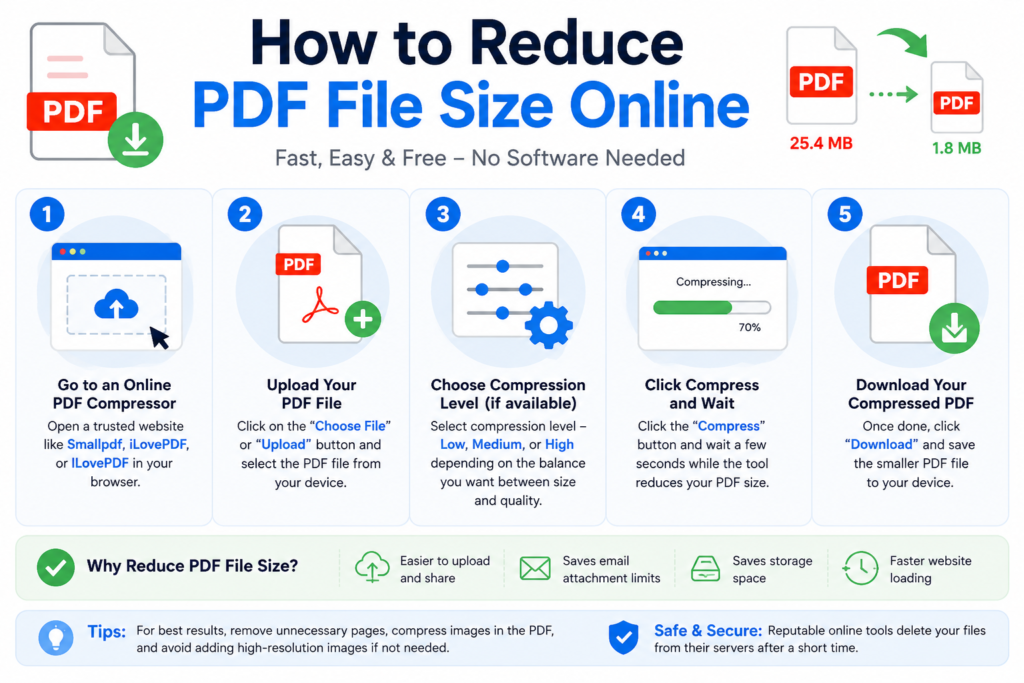
Step 1: Choose a Trusted PDF Compressor
Pick a tool that processes files securely and doesn’t store your documents longer than necessary. Free tools like Digital Creator Hub’s PDF Compressor let you compress files directly in your browser without installing software.
Step 2: Upload Your PDF File
Most tools support drag-and-drop uploads or a simple file picker. Select the PDF you want to shrink from your device.
Step 3: Select a Compression Level
Good tools offer multiple compression levels:
- Low compression keeps maximum quality, ideal for documents with important charts or detailed images.
- Medium compression balances quality and size, suitable for most everyday documents.
- High compression produces the smallest file size, best for text-heavy documents or when file size is your top priority. reduce pdf file size online free
Step 4: Compress and Preview
Click compress and let the tool process your file. Many tools show you a before-and-after size comparison so you know exactly how much space you saved. reduce pdf file size online free
Step 5: Download the Compressed File
Once compression finishes, download the new file. Always open it and check a few pages to confirm the text and images still look acceptable before you send or upload it anywhere.
Best Practices for Reducing PDF File Size Without Losing Quality
Compressing a PDF doesn’t have to mean sacrificing readability. Follow these practices to get the smallest file size while keeping your document usable.
Match Compression Level to Document Purpose
If you’re sending a PDF for online viewing or email, medium or high compression works fine since screens don’t need print-level resolution. Reserve low compression for documents headed to a professional printer.
Compress Images Before Creating the PDF
If you’re building a PDF from scratch, compress your images first using an image optimizer, then insert them into your document. This gives you more control over quality than compressing the final PDF alone.
Remove Unnecessary Pages First
Before compressing, delete blank pages or irrelevant sections. A PDF page remover tool can strip unwanted pages in seconds, which reduces file size even further before compression. reduce pdf file size online free
Scan at Lower DPI Settings
If you’re creating a new scan, set your scanner to 150-200 DPI instead of 300+ DPI unless you specifically need print quality. This produces a smaller file from the start.
Convert Scanned Text to Searchable PDF
Running OCR (optical character recognition) on scanned documents can sometimes reduce size because the resulting file stores searchable text data more efficiently than a flat scanned image.
Common Mistakes to Avoid When Compressing PDFs
Many people compress their PDFs the wrong way and end up with poor results. Watch out for these mistakes.
Compressing multiple times in a row degrades image quality with each pass, since compression is lossy. Always compress from the original file, not from an already-compressed version.
Choosing maximum compression for detailed documents can make charts, diagrams, or fine print illegible. Test a lower compression level first if your document contains important visual details.
Uploading sensitive documents to unverified tools puts your personal or business data at risk. Only use tools with clear privacy policies that confirm they delete uploaded files after processing.
Ignoring file format requirements causes problems too. Some portals require a specific PDF version or maximum size, so check those requirements before you compress and upload.
When to Use Online Tools vs Desktop Software
Online PDF compressors work well for most everyday needs: shrinking a resume, compressing a scanned form, or reducing an email attachment. They require no installation, work on any device with a browser, and process files in seconds. reduce pdf file size online free
Desktop software like Adobe Acrobat makes more sense if you’re compressing large volumes of files regularly, need offline access, or require advanced control over compression settings for professional print work. For occasional use, however, a free online tool gets the job done just as effectively without the cost.
How Much Can You Reduce a PDF File Size?
Compression results vary based on the original file’s content, but here’s what you can typically expect:
- Text-only PDFs: 10-30% reduction, since text itself is already lightweight.
- PDFs with standard images: 40-70% reduction after image recompression and downsampling.
- Scanned document PDFs: 60-90% reduction, since scans usually contain the most compressible data.
- PDFs with embedded fonts: 5-15% additional reduction through font subsetting.
If your original file is 15MB and mostly scanned images, a high-compression setting could bring it down to under 3MB while keeping the text fully legible. reduce pdf file size online free
Frequently Asked Questions
Is it safe to compress PDF files online for free?
Yes, as long as you use a reputable tool that processes files over a secure connection and deletes uploads after a short period. Avoid tools that ask for unnecessary permissions or don’t disclose their data handling practices.
Does compressing a PDF reduce its quality?
Compression can reduce image quality slightly, especially at higher compression levels, but text usually remains sharp and readable. Choosing a medium compression setting typically preserves visual quality while still cutting file size significantly.
What is the maximum file size I can compress online for free?
This depends on the tool. Most free online compressors support files up to 50-100MB, though some platforms cap free usage at a lower limit and charge for larger files.
Can I reduce PDF file size without losing quality completely?
You can minimize quality loss by using medium or low compression settings, but some quality reduction is inherent to lossy compression methods, especially for images. Text-based content generally stays unaffected.
Do I need to install software to compress a PDF?
No. Online PDF compressors run entirely in your browser, so there is no need to download or install any software on your computer or phone.
How long does it take to compress a PDF online?
Most files compress within a few seconds to a couple of minutes, depending on the file size and the number of pages. Larger files with many images take slightly longer to process.
Final Thoughts
Reducing your PDF file size doesn’t require expensive software or technical expertise. With the right free online tool, you can shrink a bulky PDF to a fraction of its original size in under a minute, while keeping the content clear and usable. Match your compression level to your document’s purpose, avoid compressing the same file repeatedly, and always preview the result before sharing it. Once you find a reliable compressor you trust, cutting down oversized PDFs becomes a quick, routine task rather than a recurring headache.